
How to Setup IPTV on MAG Box: Easy 5-Minute Guide for Every MAG Model
To setup IPTV on MAG Box takes about five minutes. Your MAG has a built-in Stalker portal, so there are no apps to install. Connect the box, enter the portal URL we send you and your channels load automatically.
5-Minute Setup
Connect, enter one link and restart.
No Apps to Install
The portal is built into every MAG.
Zero Login
Your MAC address signs you in.
We Set It Up With You
24/7 help on WhatsApp.
Setup IPTV on MAG Box: The Stalker Portal Basics
MAG boxes are built for IPTV. Every device includes a native Stalker Middleware portal, so you do not need third-party apps or complex configuration. Once you enter the portal URL we provide, your AU-IPTV subscription authenticates through your MAC address.
You get a clean TV interface with live sport, news, movies and series, a full programme guide and quick channel changes. With a stable NBN connection and a wired cable, streams run smoothly in HD and 4K. AU-IPTV delivers 50,000+ live channels and 180,000+ movies and series to your screen.
What You Need to Setup IPTV on MAG Box
Have these three things ready before you start. They prevent most setup problems.
A MAG Box
Any MAG model, including the MAG 254, 322, 420 and 424 series, with the HDMI cable and power adapter in the box.
A Stable Connection
At least 20 Mbps for HD and 50 Mbps or more for 4K. A wired Ethernet cable is the most reliable choice.
Your MAC Address
Find it on the label on the base of the box. Share it with our support team and we will send your portal link. Choose a plan to get started.
No Sideloading, No APK Files
Unlike Android boxes, a MAG Box needs no app installation. The built-in portal client does the work, so you only enter one link.

Open the Portals menu
Press Settings, then Servers, then Portals.
Enter the portal URL
Paste the link we sent you and save.
Restart the box
Your channels, guide and movies load automatically.
Setup IPTV on MAG Box in 4 Simple Steps
Follow these steps in order. The whole process takes about five minutes.
Connect and find your MAC
- Connect the HDMI cable to your TV, then plug in the power adapter.
- Use an Ethernet cable to your router. For Wi-Fi, go to Settings, System settings, Network, then Wireless.
- Find your MAC address on the label on the base, or in Settings > System settings > Device info.
Enter the portal URL
- Go to Settings > Servers > Portals.
- Enter a name such as AU-IPTV for Portal 1.
- Paste the portal URL we sent you. It must start with http://... and not https://...
- Press OK, then Save.
Restart and load the portal
- Press HOME on the remote to return to the main screen.
- Go to Settings, System, then Restart Portal. Or unplug the box for 10 seconds.
- Wait while the box connects to our server.
Enjoy your content
- The box reads your MAC address and signs you in automatically.
- Use the remote to browse live TV, catch-up shows and the movie and series library.
Follow the Video Guide
For an easy guide, follow these two videos step by step alongside the steps above.
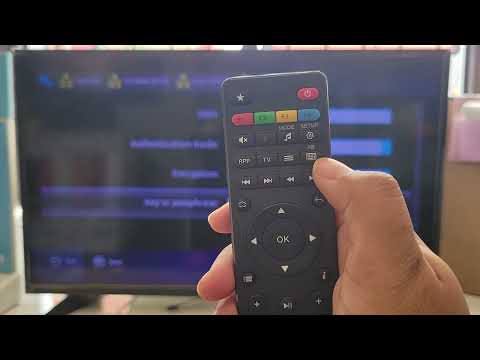
IPTV on MAG Box Hardware & Network Prep
Connect the box, choose wired or Wi-Fi and find your MAC address.
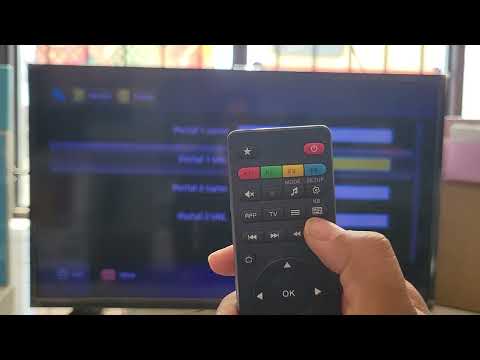
IPTV on MAG Box Enter Portal URL
Add your portal URL in Servers and Portals, then save and restart.
Crucial reminders: Use only the portal URL we send you. Unofficial or mismatched URLs cause authentication errors. Keep the URL on http://, never https://. Wired Ethernet gives the most stable streams. If a channel does not appear, contact AU-IPTV support with your MAC address.
Troubleshoot Common IPTV on MAG Box Issues
Quick fixes for the most frequent problems on MAG boxes. Most take less than a minute.
Portal URL rejected
- Re-enter the URL in Settings, System settings, Servers, Portals.
- Make sure it begins with http://. https:// fails on MAG boxes.
- Remove any trailing spaces.
- Use the exact URL we sent you.
Box offline or no connection
- Check that Settings, System settings, Network shows Connected with an IP address.
- Restart your router, then the MAG box.
- Switch to Ethernet, or move the box closer to the router.
- Set the DNS manually to 8.8.8.8 and 8.8.4.4 if the problem continues.
Audio out of sync or missing
- Stop the stream, wait 15 seconds, then resume.
- Change the audio track if the channel offers one.
- Turn off Dolby Digital in your TV's HDMI audio settings if sync issues appear.
- Restart the MAG box completely.
Subscription shows expired after renewal
- Renewals can take 2 to 5 minutes. Wait, then restart the portal.
- Confirm the renewal was made for the MAC address of this box.
- Contact AU-IPTV support with your MAC address and renewal receipt.
Your MAG Box Is Ready for IPTV
No apps, no codes and no extra box. Setup IPTV on MAG Box in minutes and enjoy HD and 4K on your TV.
IPTV on MAG Box: Frequently Asked Questions
Start Watching IPTV on Your MAG Box Today
Setup IPTV on MAG Box takes about five minutes: connect the box, enter your portal URL and restart.
For other devices, see our full IPTV setup guide. For everything about channels, plans and players, read our complete guide to IPTV for Australia.