
How to Set Up IPTV on Firestick: Easy 5-Minute Guide for Australia
Set up IPTV on Firestick in minutes with the right app, the right settings and no extra box. This step-by-step guide covers the Fire TV Stick, Fire TV Stick 4K and 4K Max, with the exact steps for the four best IPTV players.
5-Minute Setup
Enable one setting, install one app and add your login.
No Extra Box
Works on the Fire TV you already own.
Free Player Licence
Covered on our 12-month plan.
We Set It Up With You
24/7 help on WhatsApp.
IPTV on Firestick: Turn Your Fire TV Into a Full Streaming Setup
IPTV on Firestick is the simplest way to watch live channels, sport, movies and series without a pay TV contract, a satellite dish or a set-top box.
Your Firestick already runs Android-based apps. You enable one setting, install a player with the Downloader app, and add the login we send you. AU-IPTV then delivers 50,000+ live channels and 180,000+ movies and series straight to your screen.
With a stable NBN connection, IPTV on Firestick runs as smoothly as traditional TV, with a full TV guide set to Australian time. This guide shows you the exact steps and settings to use.
Before You Set Up IPTV on Firestick
Make sure you have these three things ready. It saves time and avoids the most common setup mistakes.
Your Login Details
An M3U link or an Xtream Codes login. Request a free trial or choose a plan to get yours.
A Stable Connection
At least 10 Mbps for HD, 15 Mbps for Full HD and 25 Mbps for 4K per stream.
A Phone or Computer
Some apps ask you to upload your playlist on their website, using your Firestick's MAC address.
Enable Apps From Unknown Sources
Amazon blocks direct installs of most IPTV players. This setting lets the Downloader app install them. You only need to do it once.
Open Developer Options
- From the Firestick home screen, select Settings (the gear icon on the far right).
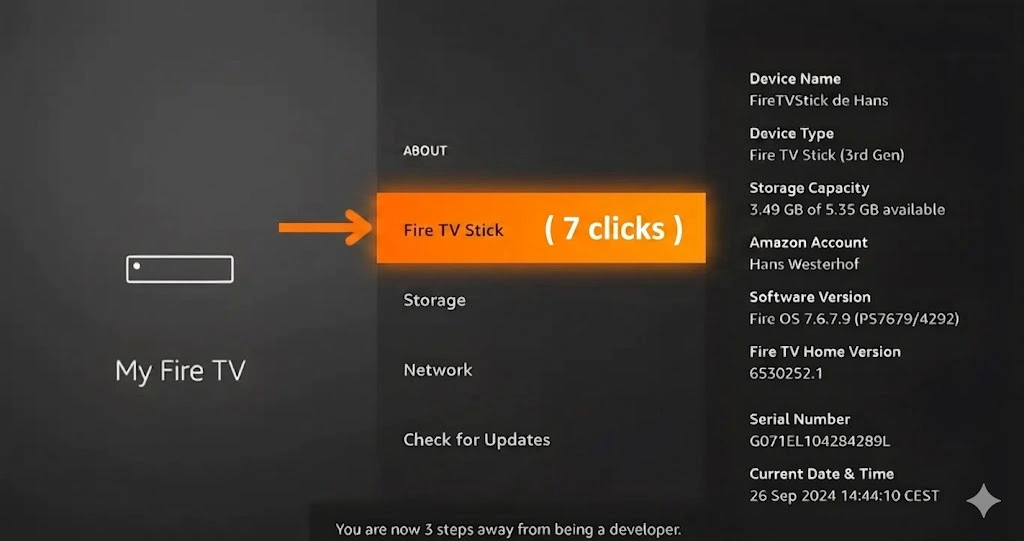
- Select My Fire TV, then About.
- Highlight Fire TV Stick and press Select 7 times until you see "You are now a developer."
Turn on Unknown Sources
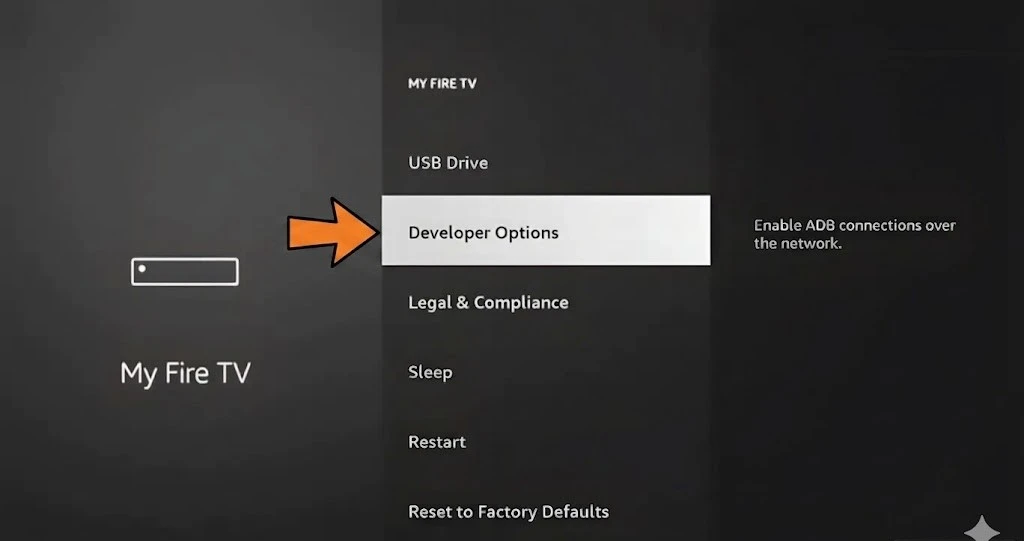
- Press Back to the My Fire TV menu and select Developer Options.
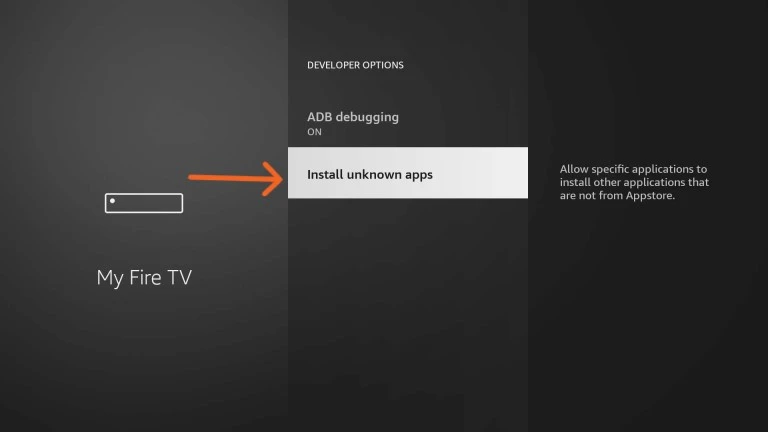
- Turn on Apps from Unknown Sources.
- Select Turn On to confirm the warning.
Done for good
- The setting stays on until you reset the Firestick.
- You do not need to repeat this for new players.
The Best App to Sideload IPTV Players

The Downloader app by AFTVnews installs IPTV players that are not in the Amazon Appstore. You type a short code and it downloads the app for you.
Install Downloader
Press Home, select the Search icon, type "Downloader" and install Downloader by AFTVnews.
Allow Unknown Apps
Complete Step 1 above so Downloader is allowed to install apps.
Enter the App Code
Type the code from the table below, select Go, then follow the install prompts.
The 4 Best Apps for IPTV on Firestick
We tested IPTV on Firestick with our Australian streams and recommend these four players. Three offer free trials from the developer, and our 12-month plan covers the licence for Hot Player and IBO Player Pro.
| App | Downloader code / source | Developer free trial | AU-IPTV 12-month plan |
|---|---|---|---|
| Hot Player | 395800 / Downloader | 30 days | ✓ Licence covered |
| IBO Player Pro | 923441 / Downloader | 7 days | ✓ Licence covered |
| SmartOne IPTV | Amazon Appstore | 15 days | Works with your login |
| TiviMate | 272483 / Downloader | No free trial | Works with your login |
Trial lengths are set by each app developer and can change.

How to Set Up Hot Player on Firestick
Hot Player (free for the first 30 days, sometimes listed as Hot IPTV) is our top pick for beginners. The interface is clean, the trial is generous and activation is simple.
On the AU-IPTV 12-month plan, we cover the Hot Player licence for you.
Install and get your MAC
- In Downloader, enter code 395800 and select Go.
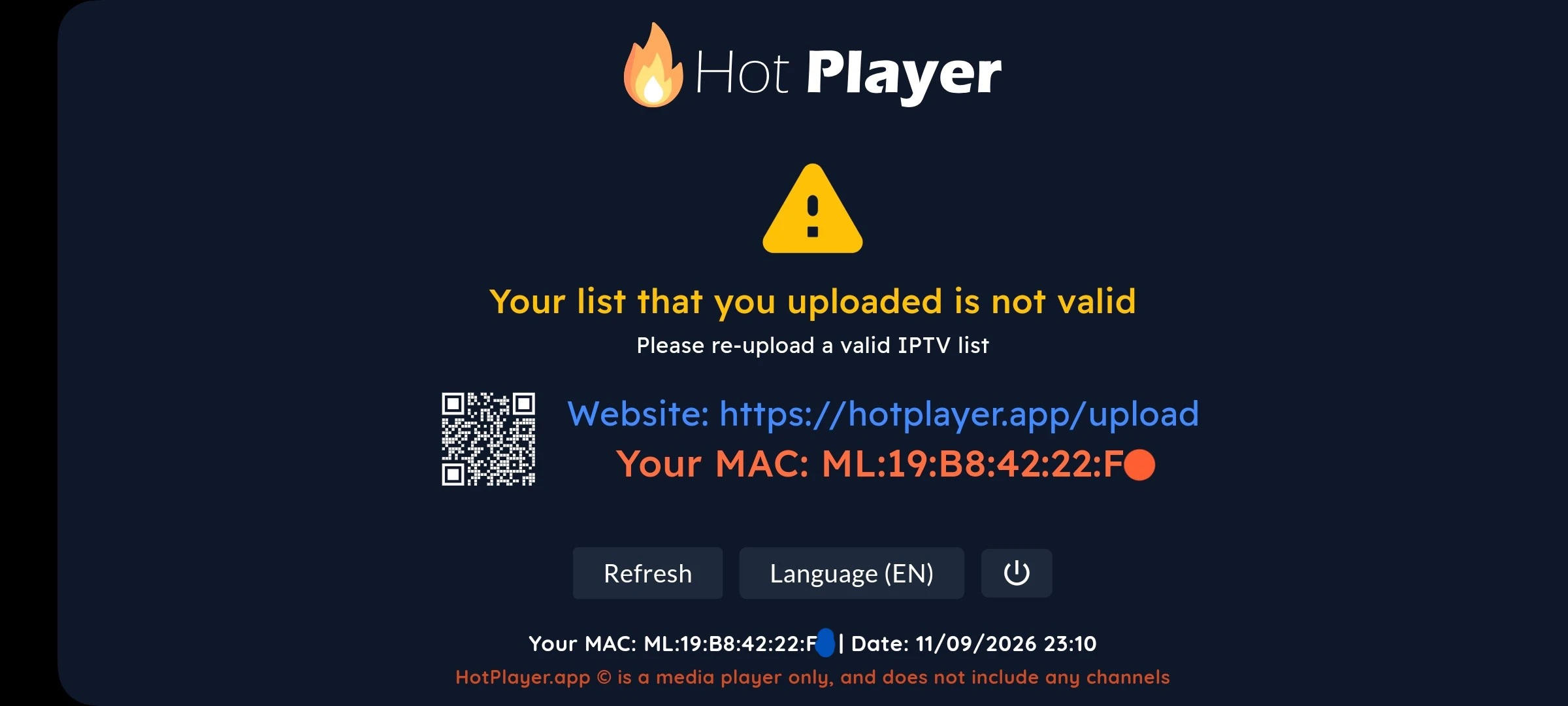
- Open Hot Player and write down the MAC address on the main screen.
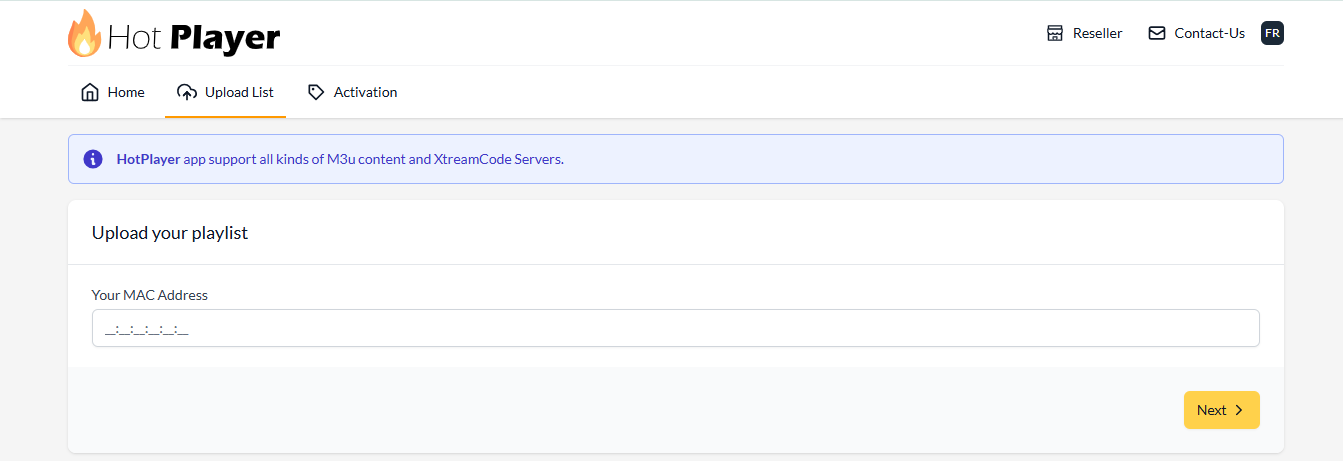
Open the upload page
- On your phone or computer, go to hotplayer.app/upload.
- Enter your MAC address and press Next.
Add your playlist
- M3U playlist URL: paste the link we sent you.
- Playlist name: for example, AU-IPTV.
- Check the link starts with http://, not https://.
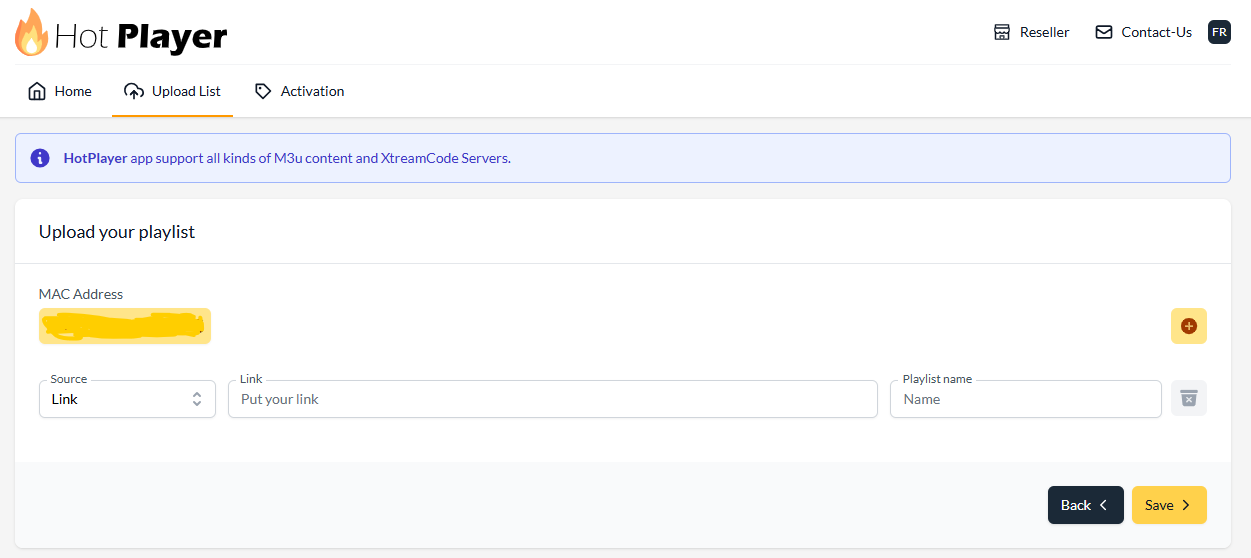
Save and restart
- Click Save.
- Restart Hot Player on your Firestick.
- The Live TV, Movies, and Series sections will appear automatically.


How to Set Up IBO Player Pro on Your Firestick
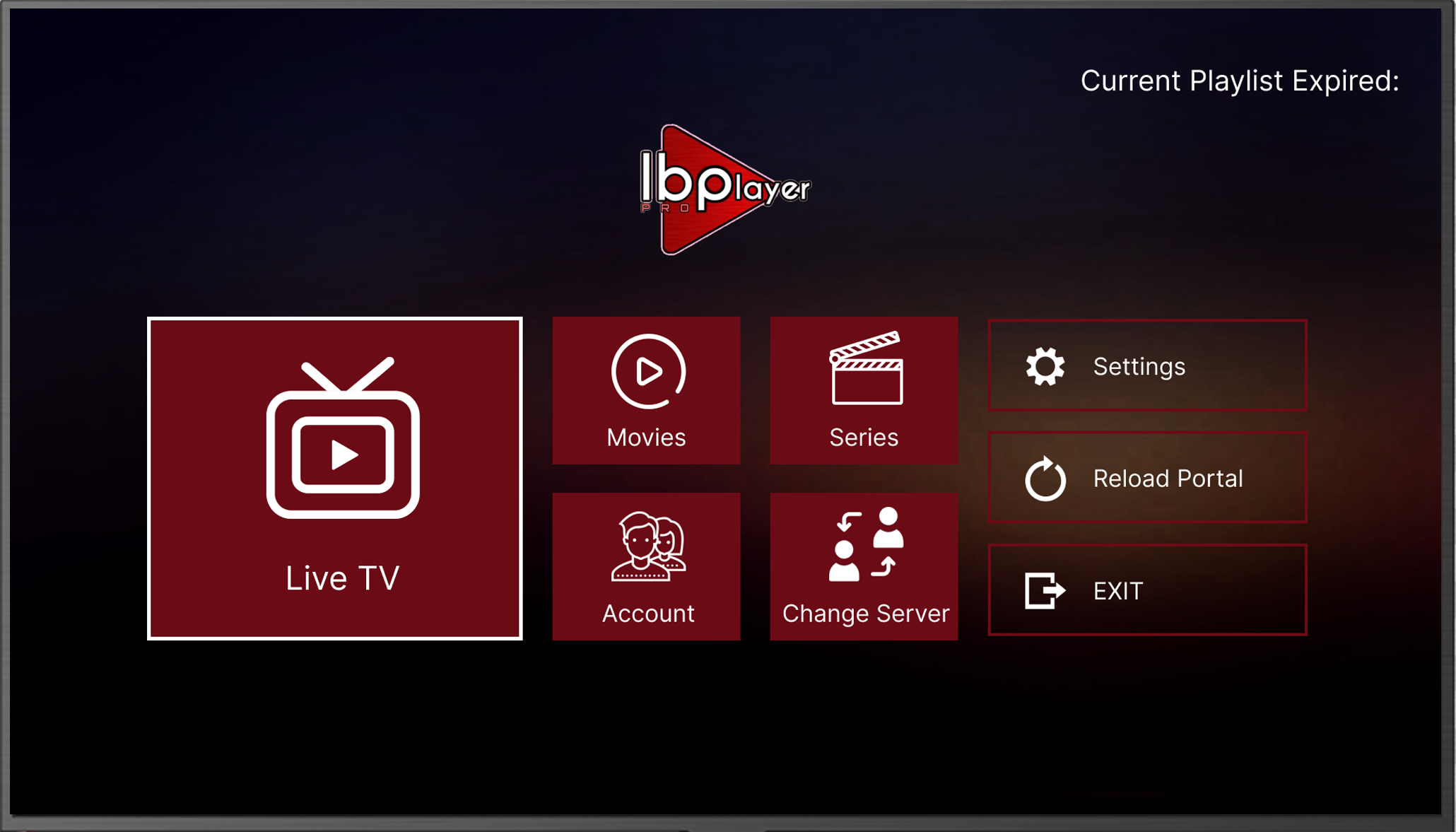
IBO Player Pro (free for the first 7 days) is one of the most popular players for IPTV on Firestick. It runs on Fire TV and Android TV, and it is a strong choice for power users.
There are many copies in app stores. Always check that the developer is listed as IRBOETECH, so you install the official version. Our 12-month plan covers its licence.
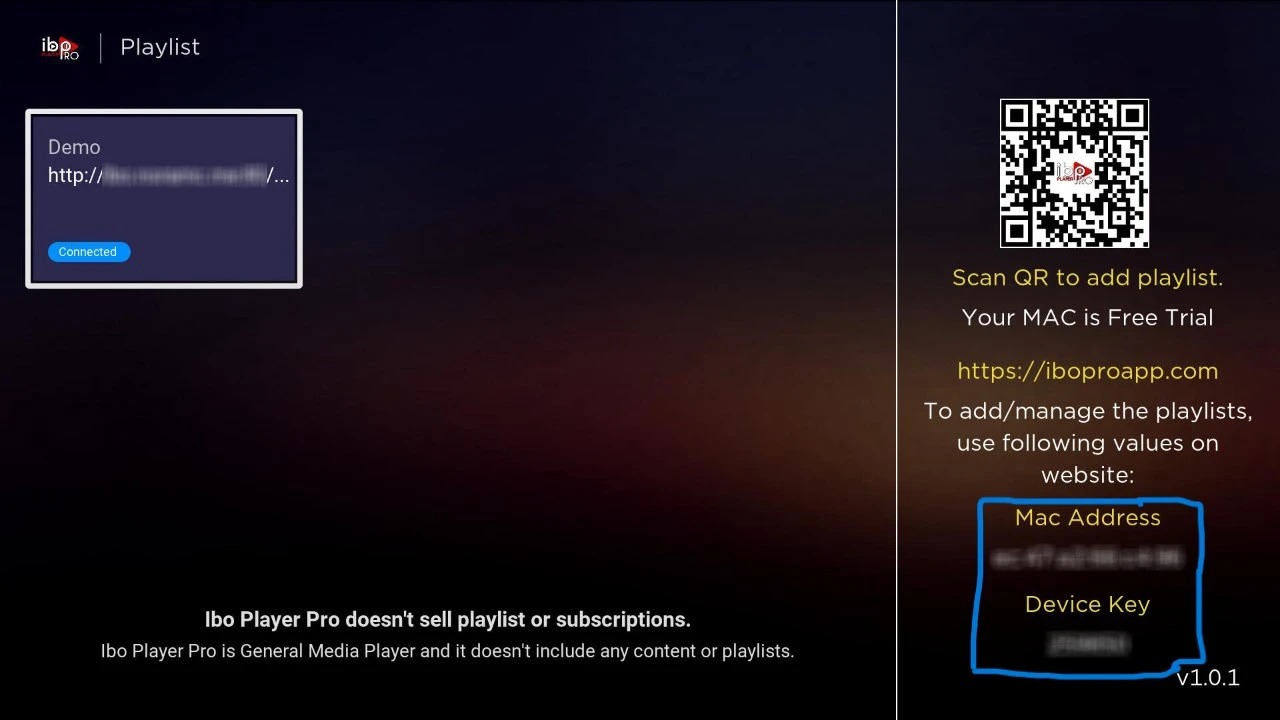
Install and get your details
- In Downloader, enter code 923441 and select Go.
- Open the app and write down the MAC address and Device Key.
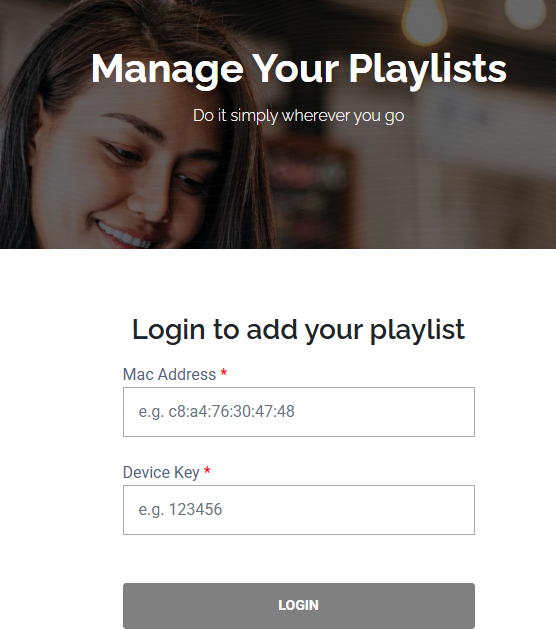
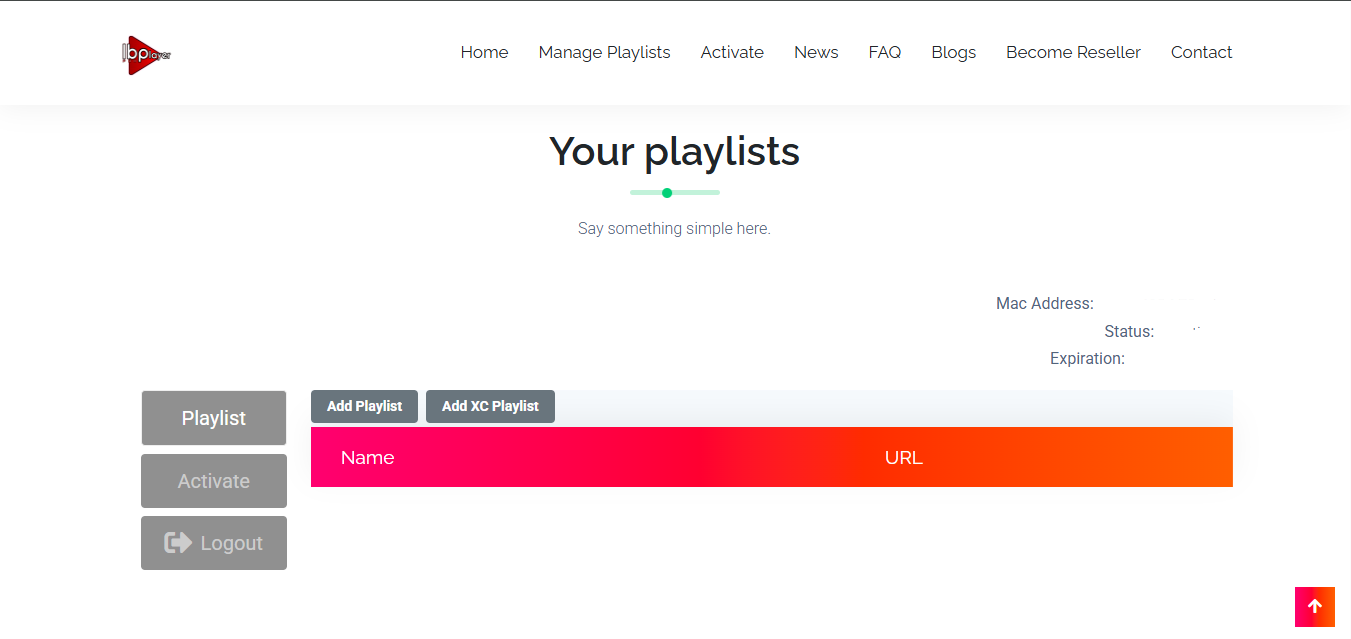
Log in to the web portal
- Go to iboplayer.pro/manage-playlists.
- Log in with your MAC address and Device Key.
Add your playlist
- Click Add Playlist.
- Paste your M3U link and give it a name.
- Make sure it starts with http:// not https://. The wrong protocol gives an empty channel list.
Start streaming
- Restart IBO Player Pro on your Firestick.
- Your live TV section, movies section and series section appear.

How to Set Up SmartOne IPTV on Firestick
SmartOne IPTV (free for the first 15 days) is available directly in the Amazon Appstore, so you do not need a Downloader code.
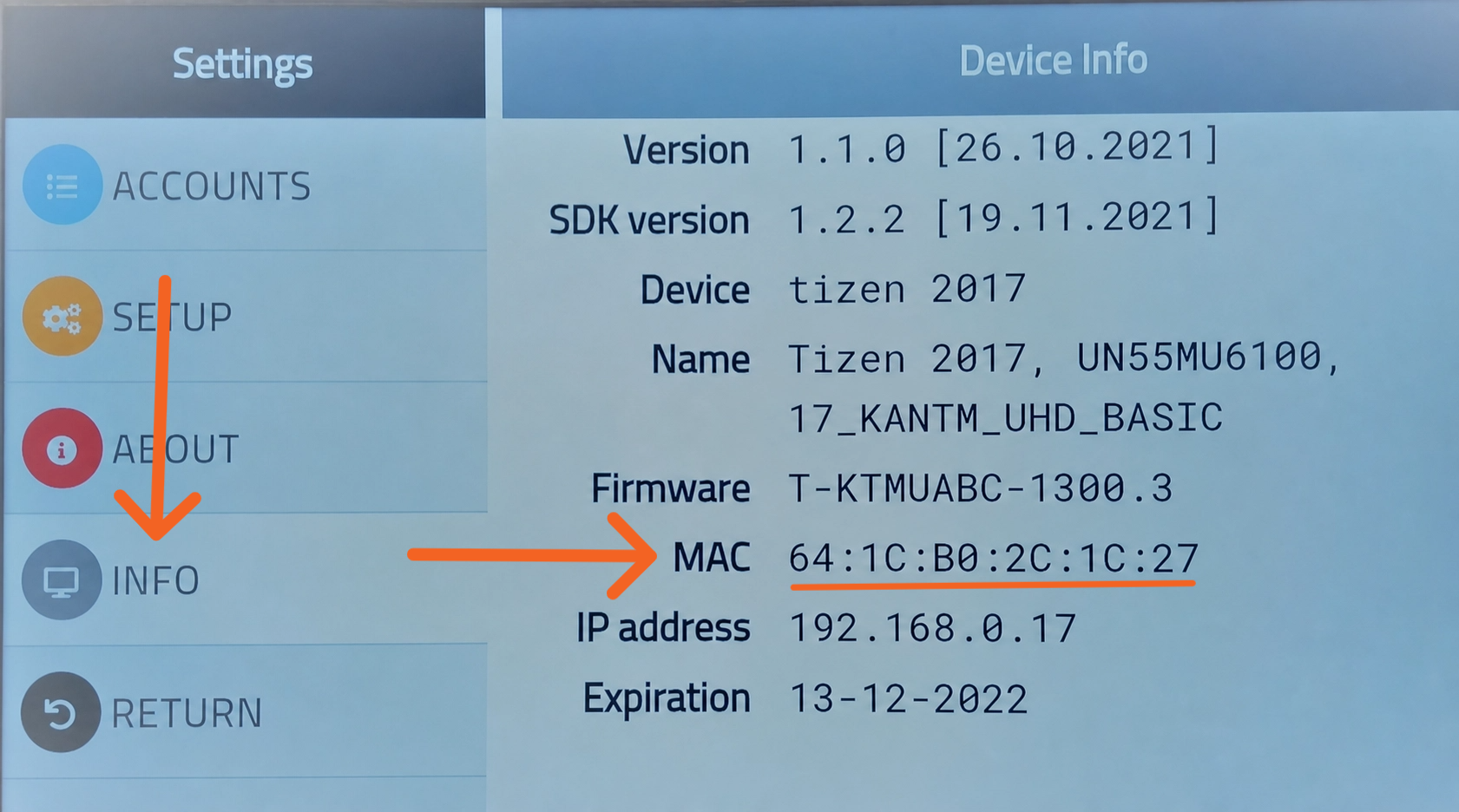
Install and get your MAC
- Search for SmartOne IPTV in the Amazon Appstore.
- Install and open it.
- Write down the MAC address shown in the app.
Upload your playlist
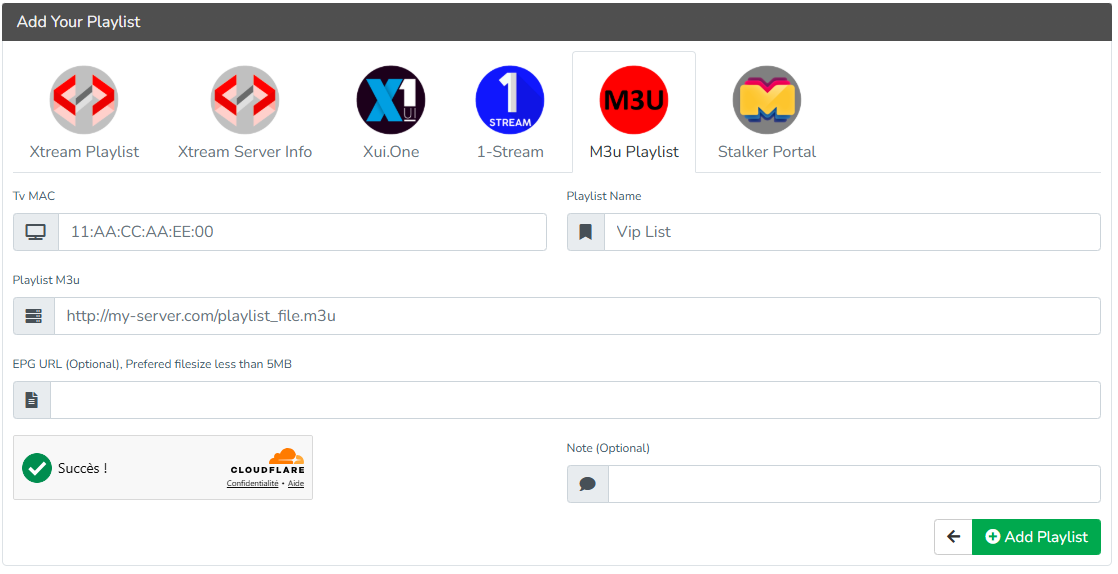
- Go to smartone-iptv.com.
- Choose Upload playlist → M3U Playlist.
- Enter your MAC, a name and your M3U link (starting with http://).
- Complete the security check and click Add Playlist.
Restart and watch
Restart the app. Your channels and movies appear automatically.
The http:// rule is the number one cause of a playlist that silently fails to load.


How to Set Up TiviMate on Fire TV
TiviMate (premium, no free trial) is one of the best IPTV players available. It is a pure Android app, so it works on Fire TV Stick 4K, 4K Max and second-generation or newer sticks with at least 1.5 GB RAM and 8 GB storage.
Its settings, TV guide and smooth performance make it the favourite of experienced users.
Install and add a playlist
- In Downloader, enter code 272483 and select Go.
- Open the app and click Add Playlist.
- Choose Xtream Codes login for the best compatibility.
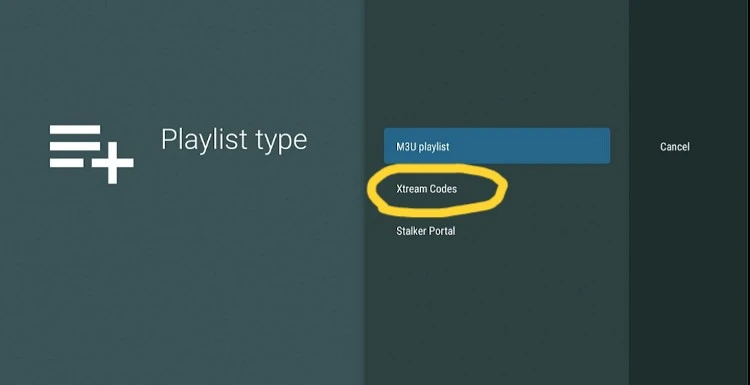
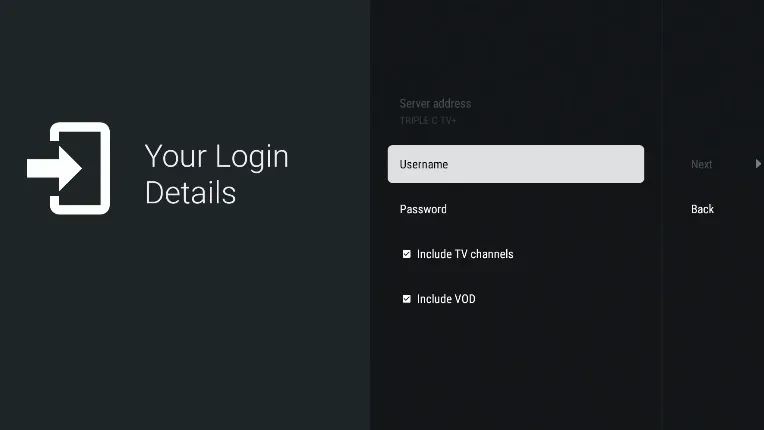
Enter your details
- Server URL
- Username
- Password
- Tick Include VOD to get movies and series.
Save and finish
- Name your playlist and click Done.
- TiviMate loads your channels and guide.
- For premium features, see tivimate.com.

Quick Comparison: Which App Is Best for IPTV on Firestick?
| Feature | Hot Player | IBO Player Pro | SmartOne IPTV | TiviMate |
|---|---|---|---|---|
| Developer trial | 30 days | 7 days | 15 days | Premium only |
| Setup speed | Very fast | Moderate | Fast | Fast |
| Best for | Beginners | Power users | No Downloader code | Power users |
| EPG and VOD | ✓ | ✓ | ✓ | ✓ |
| Licence on 12-month plan | ✓ Covered | ✓ Covered | — | — |
Our advice: start with Hot Player. If you want the most features, choose TiviMate, or IBO Player Pro if you want the licence covered.
Three Codes. One Downloader. Your Player in Seconds.
Open Downloader, type the code, press Go. That is it, your player is installed. SmartOne IPTV has no code, so find it in the Amazon Appstore. Codes are updated regularly. If one stops working, contact our support team and we will send you the new one.
Troubleshoot Common IPTV on Firestick Issues
Quick fixes for the most frequent IPTV on Firestick problems. Most take less than a minute.
Buffering or freezing
- Run a speed test on your phone connected to the same Wi-Fi.
- Switch from Wi-Fi to an Ethernet adapter.
- Unplug your router for 30 seconds.
- Pause downloads and other streams.
- Switch from 4K to HD in the app.
Playlist fails to load
- Make sure the M3U link starts with http://.
- Remove spaces before or after the link.
- Try Xtream Codes instead of M3U, or the reverse.
- Force-close and reopen the app.
- Still empty? Message us on WhatsApp.
Downloader code fails
- Check the code: HotPlayer 395800, IBO Player Pro 923441, TiviMate 272483.
- Confirm Apps from Unknown Sources is on.
- Clear the Downloader cache and try again.
- Restart the Firestick and retry.
Black screen or no sound
- Switch to a different channel.
- Update the Fire OS software.
- Set audio output to Stereo / PCM in the Firestick settings.
- Reseat the HDMI cable.
IPTV on Firestick: Frequently Asked Questions
Start Watching IPTV on Firestick Today
Setting up IPTV on Firestick takes about five minutes: enable Unknown Sources, install Downloader, choose your player and add your login.
For other devices, see our full IPTV setup guide. For everything about channels, plans and players, read our complete guide to IPTV for Australia.